Staff every event without the group texts.
Crew Scheduling turns each confirmed event into the shifts it needs: event captain, servers, bartenders, chefs, setup crew. Assign people yourself or open the shifts to your crew, who claim them from their phone. They clock in on site, you approve the hours and export payroll, and every event shows what it costs in labour.
Every event, and who's working it.
The staffing board lists your confirmed events for any date range, with each shift, the people on it and how many places are still open. Search by contract, customer, shift or name, and open any event to add shifts or move people. Gaps stand out, so you fill them days before the event, not the night before.
- Confirmed events by day, with staff filled and needed
- Every shift with its position, times and people
- Search by contract, customer, shift or staff name
- Requests waiting for your approval, in one list
- Only confirmed events can be staffed
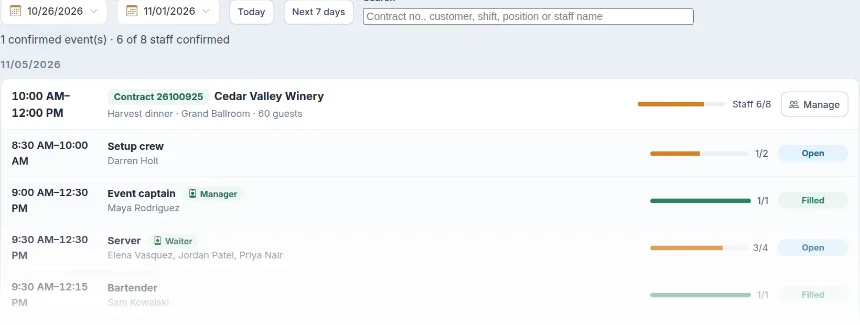
Shifts by position, labour cost on the event.
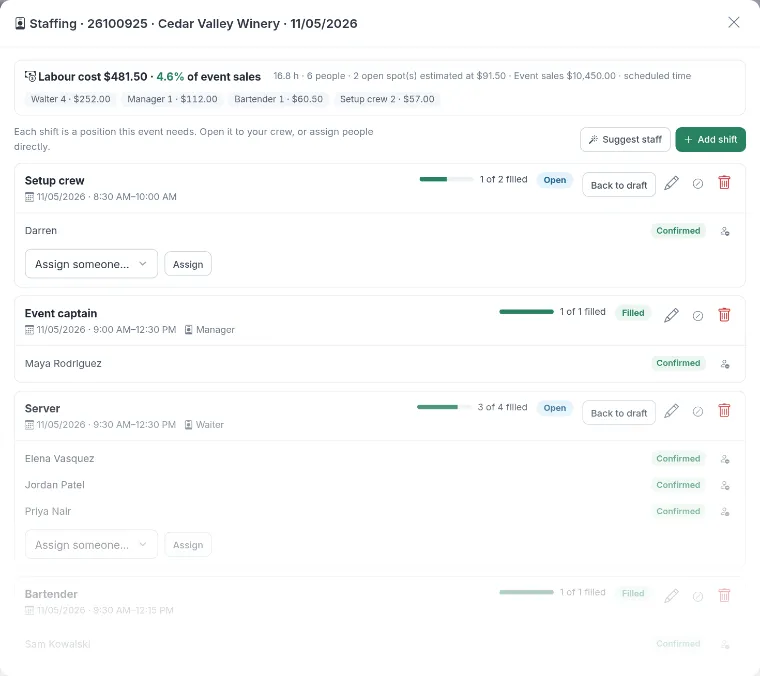
Open Staffing on any event and add shifts by position, with start and end times, how many people you need and the pay. Mark a shift VIP or urgent, assign your regulars or open it to the crew. As people are added, LightCater shows the labour cost of the event and its share of the event's sales.
- Shifts by position with times, head count and pay
- Normal, VIP or urgent priority
- Assign people or open the shift to your crew
- Warnings for overlapping shifts and too little rest
- Labour cost and % of event sales, live
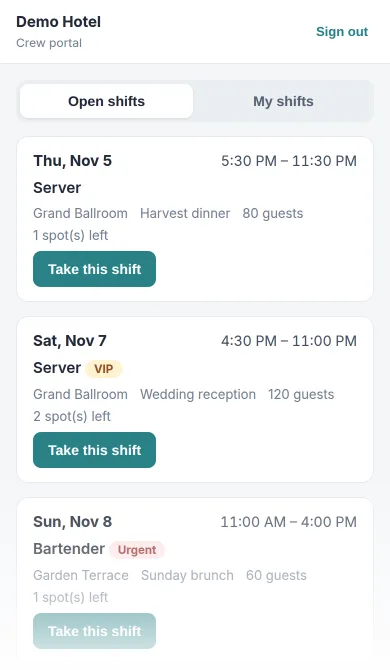
Staff claim shifts from their phone.
Your crew sign in to their own page with a one-time code sent by email; there's no app to install. They see the open shifts they can work, claim the ones they want and get an email when you approve. Their schedule goes straight into their phone calendar, and on the day they clock in and out from the same page.
- Sign in with a one-time email code, no app
- Only shifts that fit their position
- Claim, and get an email when you approve
- Their schedule in their phone calendar
- Clock in and out on site, location optional
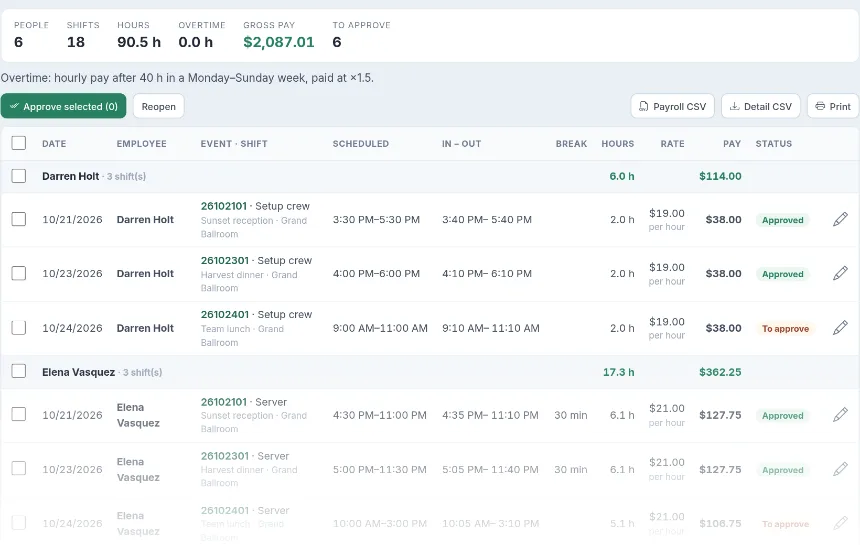
Approve hours, export payroll.
Clock-ins become timesheets: scheduled and actual times, breaks, hours, rate and pay for every shift. Fix a time if someone forgot to clock out, approve a whole week at once, and export a payroll file per employee or a detailed one per shift. Pay can be hourly, a flat amount per shift or per event, with overtime worked out for you.
- Scheduled vs actual times, breaks and hours
- Hourly, per-shift or per-event pay, by position or person
- Weekly overtime at the multiplier you set
- Approve in bulk; reopen if needed
- Payroll CSV, detail CSV and print
The right crew, suggested for you.
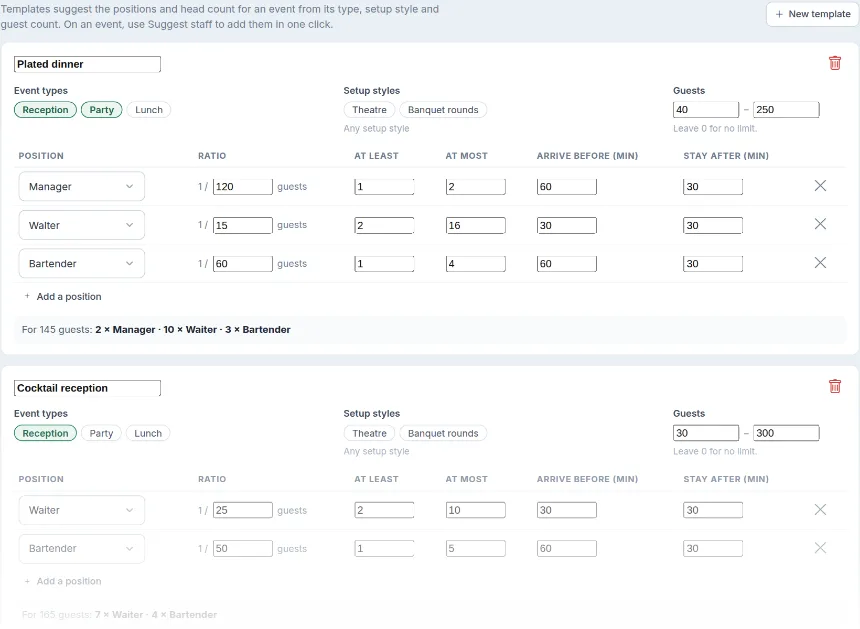
Tell LightCater how you usually staff: one server per 15 guests at a plated dinner, a bartender per 60, a captain for every event. Templates match the event's type, setup style and guest count, and Suggest staff adds the shifts to the event in one click, with arrival and finish times built in.
- Ratios per position, with a minimum and maximum
- Matched by event type, setup style and guest count
- Arrive-before and stay-after times per position
- Suggest staff adds the shifts in one click
- A preview of the crew for a sample guest count
From the first shift to payroll.
- Add your crew and positions. Set each position's pay, or a rate per person.
- Invite your crew. They get an email and sign in with a one-time code.
- Staff your confirmed events. Use a template or add shifts, then assign or open them.
- Approve and pay. Approve the timesheets and export payroll.
Crew Scheduling lives on the event, next to the BEO, the menu and the room, so the people working the event see the same plan as the kitchen.
Choose how shifts are released: open to everyone, to your best people first, by request, or assigned by you.
Crew scheduling questions.
Do my staff need to install an app?
Can I choose who sees a shift first?
Does it stop double-booking staff?
How is pay calculated?
Can I export payroll?
How is it priced?
Staff your next event in minutes.
Book a 30-minute demo and we'll staff one of your events with you, from shifts to payroll.