Rent out your equipment, never double-book it.
Rental Inventory tracks the chairs, tables, linens, tableware and equipment you rent out or send to events. Book items for a rental period and LightCater checks every other booking, shows you each day's availability and what goes out and comes back, and handles check-in, repairs and damage charges.
Know what's free before you promise it.
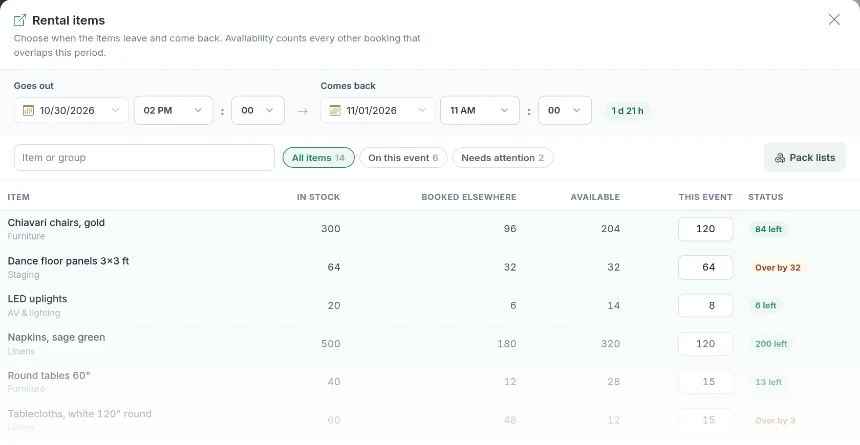
Add rental items to an event and choose when they go out and when they come back. LightCater counts every other booking that overlaps that period and shows, item by item, what's in stock, what's booked elsewhere and what's still available. If you ask for more than you have, you see the shortage before you save.
- A rental period per event, or one period for the whole contract
- In stock, booked elsewhere and available for every item
- Shortage warnings before you save
- Multi-day contracts: let events add up, or reuse the same items from one day to the next
- Cancelled contracts free their items right away
Book a table, its chairs come with it.
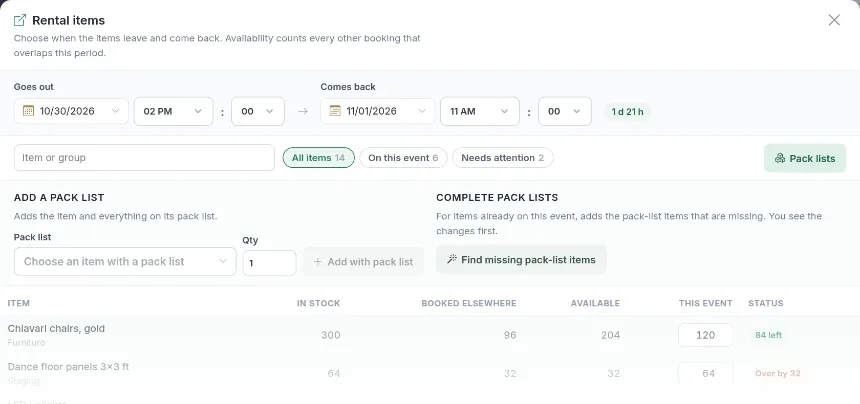
Give an item a pack list and it brings everything that goes with it: book a round table and its chairs, linen and centerpiece are added too, at no charge if you like. Already have items on the event? One click finds the pack-list items that are missing and shows you the changes first.
- Pack lists per rental item
- Add an item with its whole pack list in one step
- Pack-list items can be added at no charge
- Find and add missing pack-list items on an event or a whole contract
Every day's stock, at a glance.
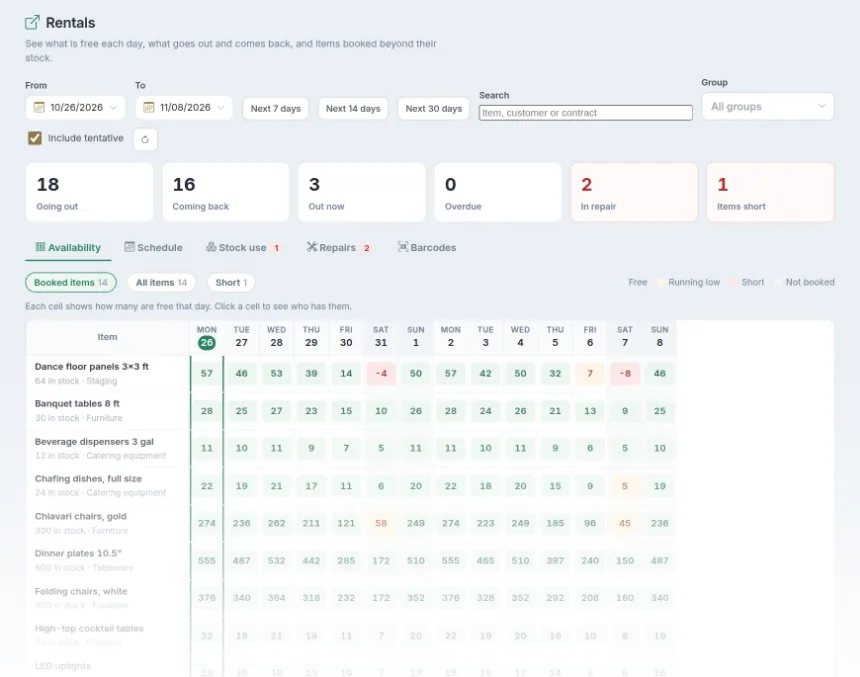
The Rentals page shows how many of each item are free on each day, coloured free, running low or short. Click a day to see who has them. The schedule lists what goes out and comes back each day, with the contract, and prints as a pick list for the warehouse.
- Availability board by day: free, running low or short
- Click a cell to see which events have the items
- Schedule of everything going out and coming back
- Include or leave out tentative bookings
- Stock use: the most out at once, and when
- Print the schedule or a pick list
What goes out today, what comes back.
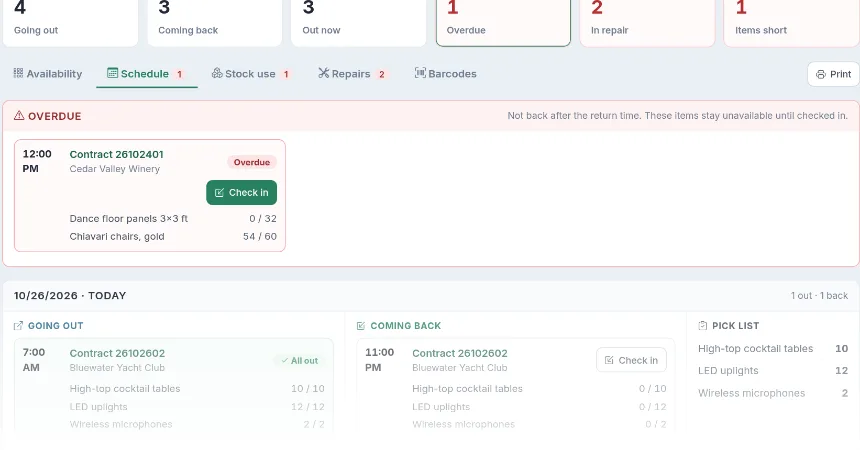
The schedule lists every contract whose items go out or come back each day, with the time, the customer and how many of each item are out or back already. Overdue returns sit at the top, so nothing stays missing for long. Each day has a pick list for the team loading the van, and the whole schedule prints in one click.
- Going out and coming back, day by day, with times and contracts
- Overdue returns flagged at the top
- A pick list per day: everything to load, added up
- Check out or check in right from the schedule
- Print the schedule for the warehouse
Scan it out, scan it back in.
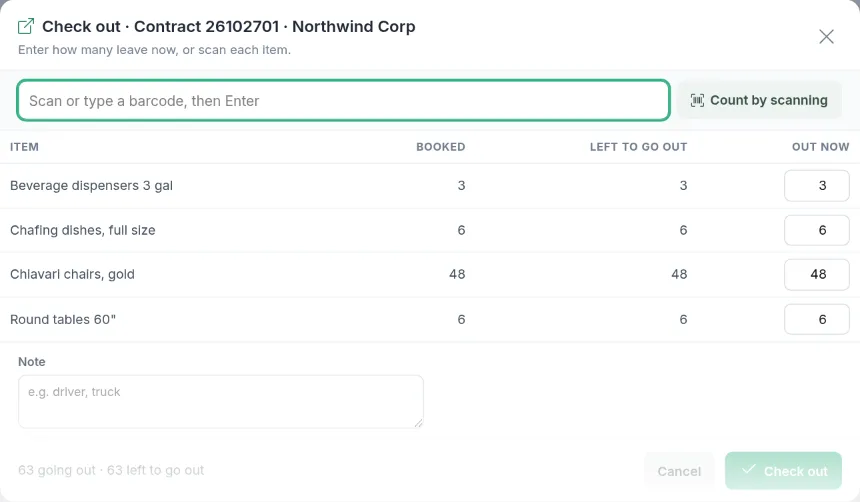
When the truck is loaded, check the items out; when they come back, check them in as OK, damaged, lost or needing cleaning. Type the counts, or scan each item with a barcode scanner or your phone's camera. Items that aren't back on time show as overdue and stay unavailable until they're checked in.
- Barcodes for every rental item
- Scan with a scanner or the camera of a phone or tablet
- Back OK, damaged, lost or needs cleaning
- Photos of damage saved to the contract files
- Overdue items flagged and kept out of availability
Damage gets charged, not forgotten.
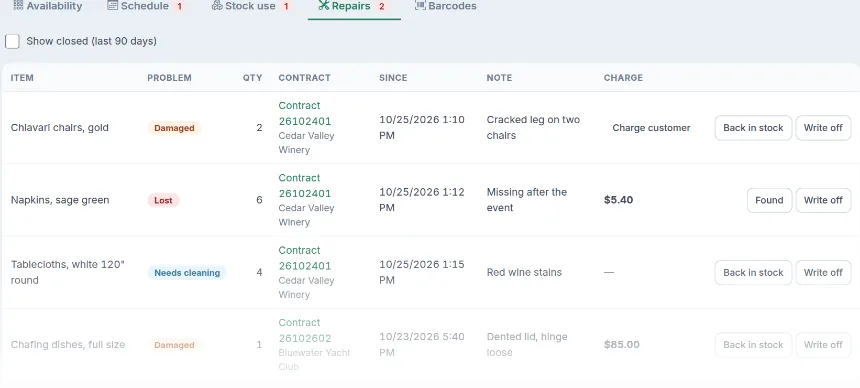
Damaged, lost and dirty items go to Repairs, where they stay unavailable until they're back in stock or written off. Charge the customer in one click: the charge goes on their contract, with the item's replacement cost suggested.
- A repairs list of everything not ready to rent
- Back in stock, or written off for good
- Charge the customer right on the contract
- Replacement cost suggested for damage or loss
Up and running in an afternoon.
- Switch on Rental Inventory in the in-app Marketplace.
- Set up your rental items: how many you have, plus pack lists, barcodes and replacement costs if you want them.
- Add rental items to your events. LightCater checks availability for the rental period and puts every move on the schedule.
Rental Inventory works with the events and contracts you already have in LightCater: rental items are booked on the event, and damage charges go on the same contract.
Use it for equipment you rent to clients, or for your own equipment that goes out to events: either way, you always know where it is and when it's free.
Rental inventory questions.
What can I track?
Does it stop double bookings?
Do I need barcodes?
What happens when something comes back damaged?
How do multi-day events work?
What does it cost?
Know where every chair is, every day.
See Rental Inventory in a 30-minute demo, or start a free 14-day trial.