What to cook, what to order, what to load.
Your confirmed events already say what the kitchen and the warehouse need. The prep sheet adds up every dish for the days you choose and, with recipes, the ingredients to buy. Purchase orders go to the right supplier in one click, and each event's pack list is built from its menu and printed for the team loading the van.
Every dish to prepare, added up for you.
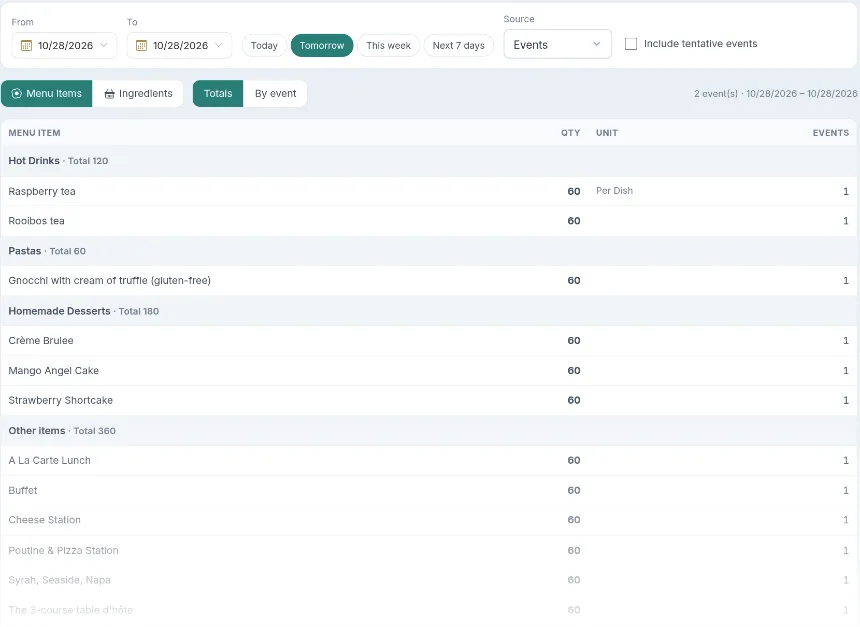
Pick a day, tomorrow, this week or any range. The prep sheet adds up every menu item across your confirmed events, grouped by category, with the quantity and how many events need it. Switch to By event to see each event's list, include tentative events when you plan ahead, then print it for the kitchen or export it.
- Totals across events, grouped by menu category
- By event, for each event's own list
- Today, tomorrow, this week or any dates
- Include tentative events when you plan ahead
- Print for the kitchen or export to CSV
Ingredients needed, against what you have.
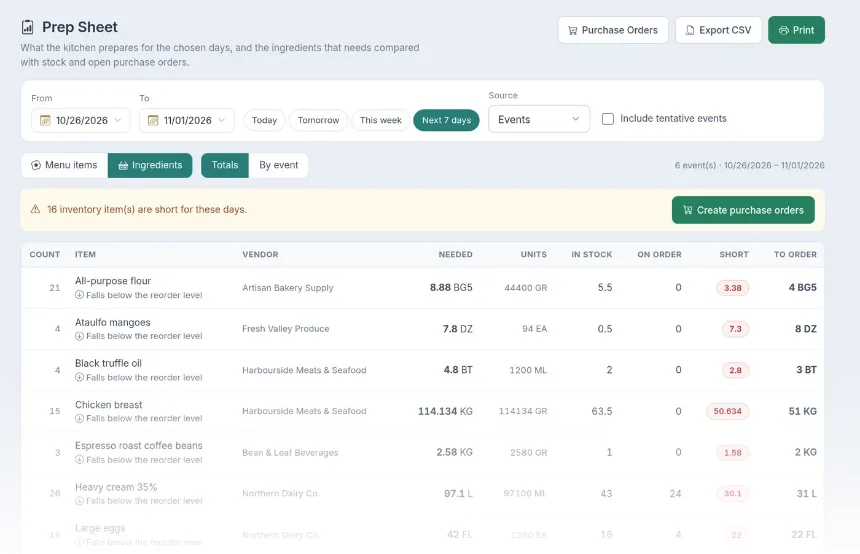
With Recipe Management, the prep sheet also turns those dishes into ingredients. For each one you see what the recipes need, what's in stock, what's already on order and what's missing, grouped by supplier. Everything that's short can go onto a purchase order straight away.
- Ingredient totals from your recipes and sub-recipes
- In stock and already ordered, side by side
- What's short, grouped by supplier
- Turn shortages into purchase orders in one click
Order from your suppliers, receive into stock.
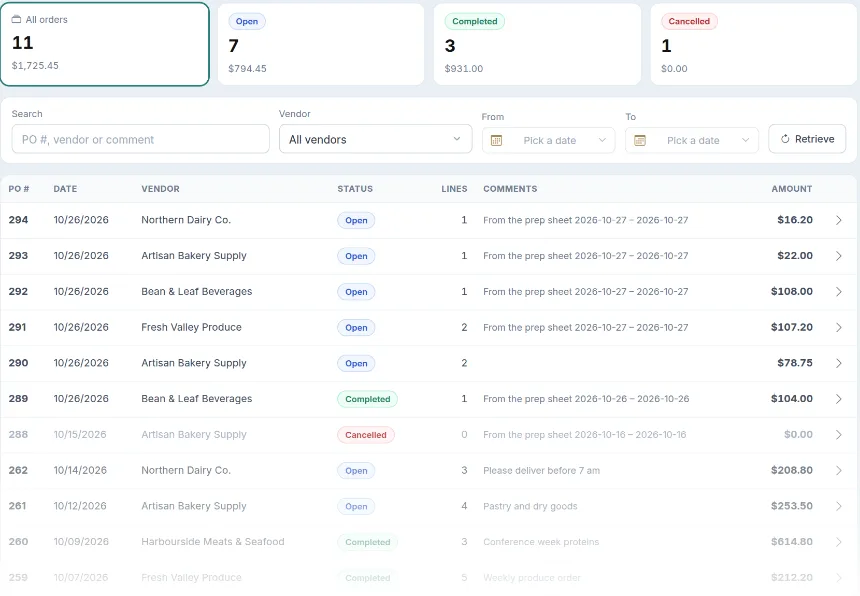
Create purchase orders from the prep sheet, from low stock or by hand. Each order has its supplier, lines and total, and you follow it from open to completed. When the delivery arrives, receive it and the stock and costs update, so the next prep sheet and your food cost are right.
- Orders from the prep sheet, low stock or by hand
- Open, completed and cancelled at a glance, with totals
- Search by order number, supplier or comment
- Receive deliveries into inventory
- Ingredient costs kept up to date
Set it once: what each item needs.
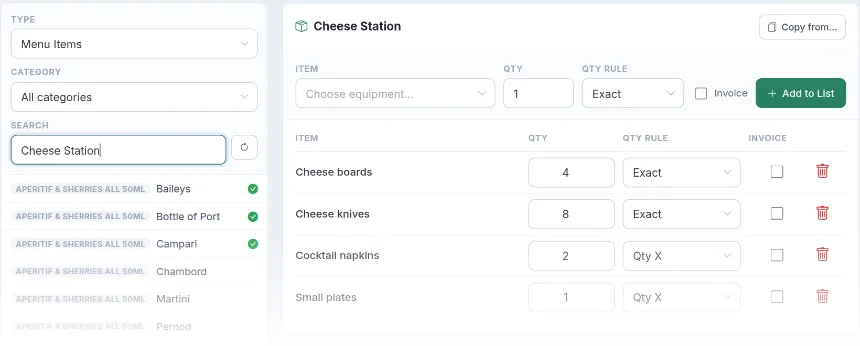
Tell LightCater what goes out with each menu item or piece of equipment: a cheese station needs boards, knives, napkins and plates; a chafing dish needs fuel cans. Each line has a quantity rule, a fixed number or one per guest or portion, and can be added to the invoice if you charge for it. Copy a pack list from a similar item to save time.
- Pack lists for menu items and equipment
- Fixed quantities or a quantity per portion
- Optionally added to the invoice
- Copy a pack list from another item
- A tick shows which items already have one
Each event's list, built from its menu.
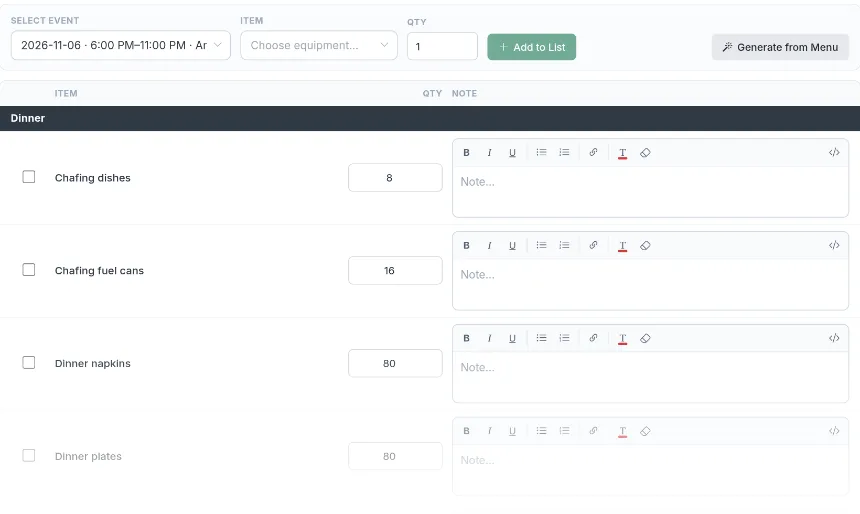
On the contract's Packlist tab, choose the event and press Generate from Menu: every pack-list item for its menu and equipment is added up for the guest count, grouped by category. Add anything extra, change a quantity, add a note for the team, and the list stays with the event.
- Generated from the event's menu and equipment
- Quantities that follow the guest count
- Extra items and notes per line
- Grouped by category
- One list per event, kept on the contract
A pack list the team can tick off.
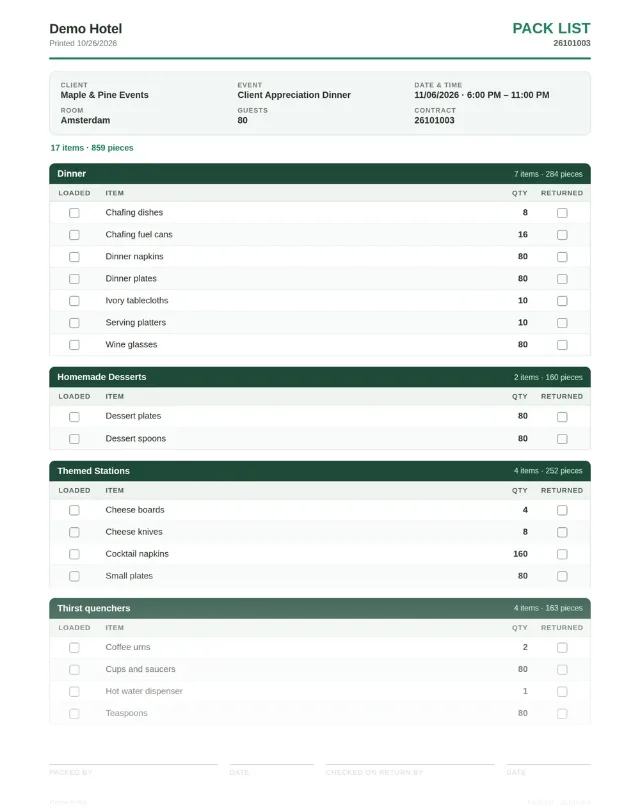
Print the pack list with the client, event, date and time, room or delivery address and guest count at the top. Items are grouped by category with a Loaded and a Returned box for each, and sign-off lines for whoever packed and checked it on return.
- Event details and delivery address at the top
- Items and pieces counted for you
- Loaded and Returned boxes on every line
- Packed-by and checked-on-return sign-off
From the menu to the loading dock.
- Confirm your events. Menus and guest counts on confirmed events feed everything else.
- Open the prep sheet. Pick the days and print what to cook; check the ingredients.
- Order what's short. Turn shortages into purchase orders and receive them into stock.
- Pack and load. Generate each event's pack list and print it for the van.
Everything comes from the event record, so when a guest count or a menu changes, the prep sheet and the pack list follow.
Running delivery or off-site events? The delivery address and times on the event print on the pack list too.
Prep sheet and pack list questions.
Do I need recipes to use the prep sheet?
Which events are included?
Can the pack list follow the guest count?
Can we charge for packed items?
Can we print for the kitchen and the warehouse?
Run your kitchen from the event.
Book a 30-minute demo and see the prep sheet, purchase orders and pack lists with your own menu.