Sell tickets to your events, check guests in by QR.
Hosting a gala dinner, a wine tasting, a holiday party or a conference? Event Registration gives every event its own booking page. Guests choose their tickets, answer your questions and pay online; each one gets a QR ticket by email, and your team checks them in at the door from a phone. The guest list lives on the event, next to the menu, the room and the BEO.
Every event gets its own booking page.
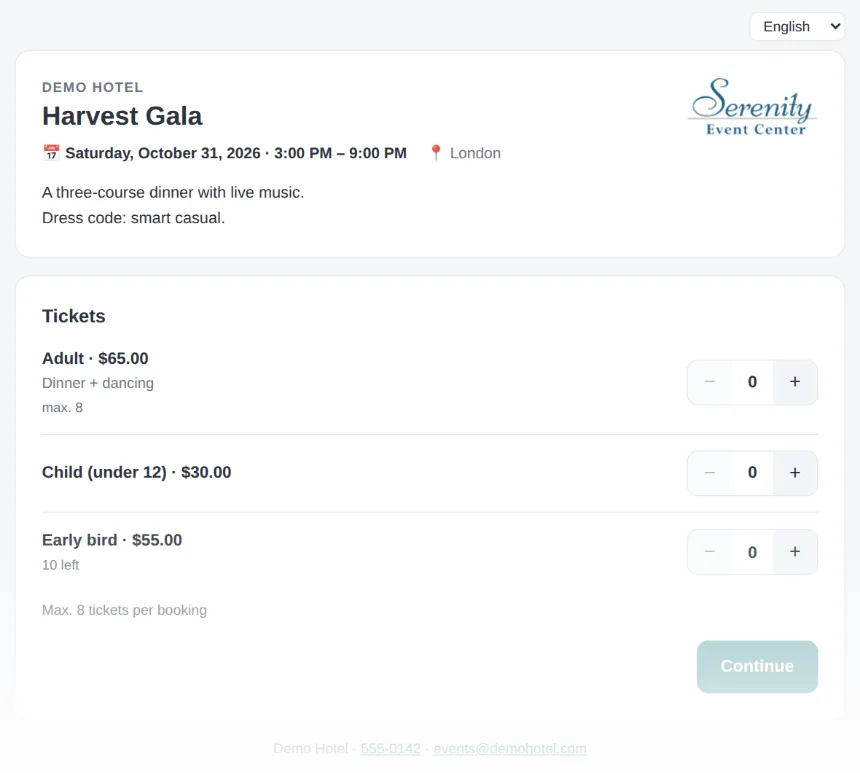
Turn on registration for an event and LightCater creates a page with your logo, the event title, date, time and room, and your description. Share the link by email, on social media or on your website. Visitors see the page in their own language, and you decide how many places there are, how many tickets one booking can take, and when registration closes.
- A page for each event, with your logo, date, time and room
- Shown in English, French, Spanish, German, Italian or Dutch
- Total places and a limit per booking
- Open or close registration with one tick
- A new link at any time if the old one was shared too widely
Ticket types and the questions you need.
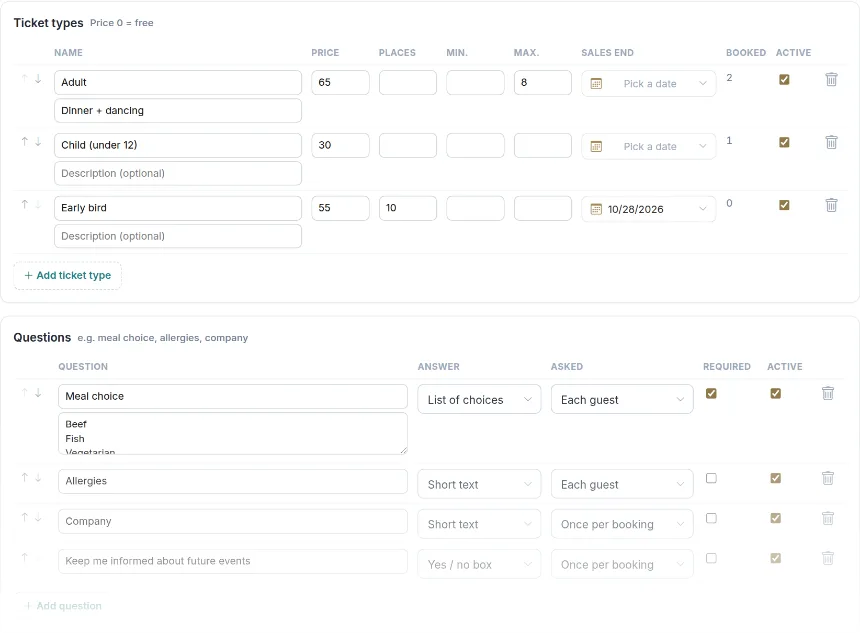
Set up as many ticket types as the event needs: adult and child prices, members, early bird or free tickets. Each type can have its own number of places, a minimum and maximum per booking and a date when sales end. Then add the questions you need answered, such as meal choice, allergies or company name, asked once per booking or for every guest.
- Ticket types with price, places, min / max and a sales end date
- Free tickets: just set the price to 0
- Questions as a list of choices, short text or a yes / no box
- Asked once per booking or for each guest, required or optional
- Tax added to the ticket price when you need it
Booked on any phone, paid before they arrive.
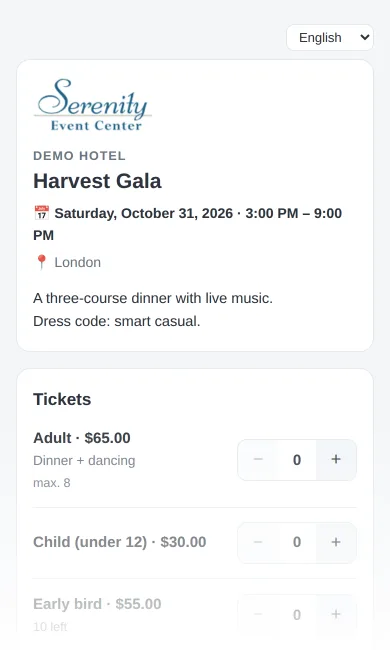
The booking page works on every phone. Guests pick their tickets, enter each guest's name and answers, and pay by card. Places are held for 15 minutes while they pay, so nobody books a seat that's already gone. Prefer to collect payment later? Untick card payment and bookings are confirmed right away.
- Card payment online, with places held while the guest pays
- Or confirm now and collect payment later
- A confirmation email with a QR ticket for every guest
- Guests with their own email get their own ticket
- A link to view the booking, and to cancel it while it's unpaid
Know who's coming, check them in at the door.
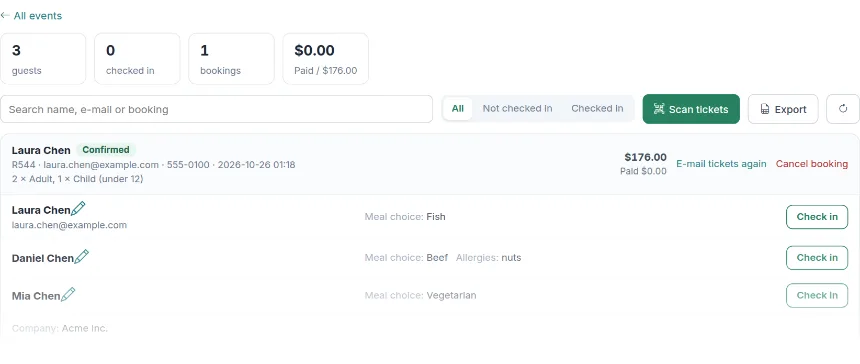
Every booking lands on the event's guest list with its tickets, answers and payment. Search by name, email or booking number, filter by checked in, and check guests in one by one or scan their QR tickets with a phone camera. Your kitchen sees meal choices and allergies on the same event, and the guest count on the event can follow the registrations.
- Guests, checked in, bookings and payments at a glance
- Scan QR tickets with any phone camera
- Email tickets again or cancel a booking
- Edit a guest's name or answers
- Export the guest list to a spreadsheet
Everything a ticketed event needs, in one place.
Event Registration is part of the event itself, so tickets, guests, menu, room and billing stay together.
Booking page
One per event
- Your logo, title, date, time and room
- Six languages
- Places and per-booking limits
Ticket types
Prices and limits
- Adult, child, member, early bird or free
- Places, min and max per type
- Sales end date per type
Guest questions
Per booking or per guest
- Meal choice and allergies
- Choices, short text or yes / no
- Required or optional
Payments
Online or later
- Card payment when booking
- Places held while paying
- Or confirm now and pay later
QR tickets
One per guest
- Sent in the confirmation email
- Manage-booking link
- Email tickets again in one click
Check-in & export
At the door
- Scan with a phone camera
- Check in one by one
- Spreadsheet export of every guest
From set-up to the door in four steps.
- Turn on registration. Open the contract's Registration tab and pick the event.
- Set up tickets and questions. Add ticket types, prices, places and the questions you need.
- Share the link. Send it to your guests or put it on your website and social media.
- Check guests in. Scan QR tickets at the door and see who has arrived.
Registrations are part of the event, not a separate system: the BEO, the menu, the room and the billing are all on the same contract, so the kitchen and the floor team work from the same numbers as the box office.
Hosting the same event every year? Copy the contract and its registration set-up comes with it.
Event registration questions.
What kind of events is it for?
Can guests pay online?
Does every guest get a ticket?
How do we check guests in?
Can we ask about meal choice and allergies?
In which languages is the booking page?
Run your next ticketed event in LightCater.
Book a 30-minute demo and we'll set up tickets, questions and check-in for one of your events.